Skip to content
Indie Author Academy
Workspace
HomeNew
Library
BucketsNew
AnalyticsNew
FinancesNewCalendarPlansFeedbackUser ManualMCPNewJoin Discord
Indie Author Academy
  1. Manual

How MIRA works

What to click, and what you should see next.

Loading the manual…
HomeLibraryBucketsAnalytics
Skip to content
Indie Author Academy
Workspace
HomeNew
Library
BucketsNew
AnalyticsNew
FinancesNewCalendarPlansFeedbackUser ManualMCPNewJoin Discord
Indie Author Academy
  1. Manual

How MIRA works

What to click, and what you should see next.

Start here

  1. Step 1: Add a book
  2. Step 2: Generate
  3. Step 3: Build a post
  4. Step 4: Publish
  5. Step 5: See results

Topics

Getting startedAdd a bookFind your best scenesGenerate a slide deck or imageWrite your own slide deckBuild a postConnect TikTokPublish or schedulePost automatically with BucketsSee your resultsCredits and plansSettings & account

Publish or schedule

Send a post now or pick a date. Every time, you choose how it lands: as a draft you publish from the TikTok app, or live on your profile.
Steps

  1. 1Step 1: Open the post and click Post or SchedulePick the account (or several) and, to schedule, the date and time.
  2. 2Step 2: Choose “Save as draft” or “Post directly”Draft waits in your TikTok inbox. Direct goes live and can’t be undone from MIRA.
  3. 3Step 3: ConfirmScheduled posts appear on the Calendar.

At a glance

Draft
You publish in TikTok
Direct
Live right away
Draft hashtags
First 5 kept

Good to know

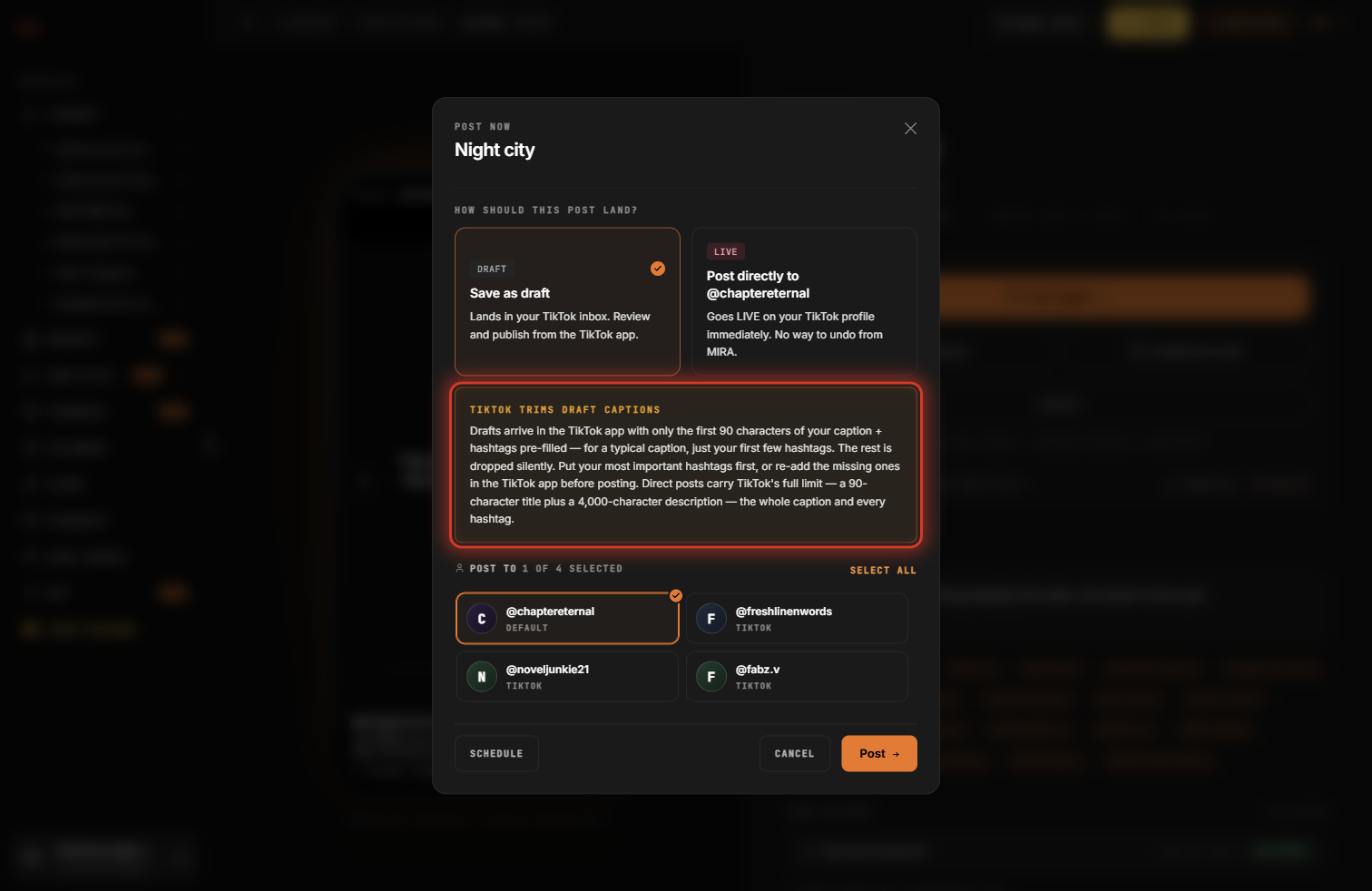
  • On a photo draft your description arrives in full, but only the first 5 hashtags are kept: put the important ones first.
  • A video draft arrives with no text at all: write it in the TikTok app, or post directly.
See it in the appHide the screenshot
The Post window with Save as draft selected and the hashtag warning.
Previous topic: Connect TikTokNext topic: Post automatically with Buckets

Common questions

My post isn’t on TikTok after I clicked Post.

If you chose Save as draft, it’s waiting in your TikTok inbox: open the TikTok app and tap Publish. If you chose Post directly, give it a few minutes and refresh your profile.

It says I’m out of credits.

Only generating needs credits. Click your credits in the top bar to buy more; they never expire. You can still build, post and schedule.

My new slide deck or image isn’t showing.

It can take up to a minute. Refresh the page and look in the book’s Content › Assets.

I don’t see my book.

Check you’re signed in with the right email. A Booketeer book takes 1–2 hours to finish.

Words MIRA uses · 8
Scene
One moment from your book.
Booketeer
MIRA’s reader: finds and ranks your best scenes.
Asset
A slide deck, image or video for one book.
Slide deck
Swipeable text slides over an image.
Creation
A finished post, ready to publish or schedule.
Draft / Direct
Lands in your TikTok inbox, or goes live.
Bucket
Posts for you on a schedule.
Credit
1 per generated slide deck or image.

Still stuck?

Tell us what happened and when. A screenshot helps.

Send feedbacksupport@indieauthormedia.com
HomeLibraryBucketsAnalytics